React has become one of the most widely adopted libraries for building user interfaces. Its component-based architecture, declarative style, and rich ecosystem make it a powerful tool for projects of any size. But writing good React code requires more than just knowing JSX, it requires understanding
Khalid Edaoudi
React has become one of the most widely adopted libraries for building user interfaces. Its component-based architecture, declarative style, and rich ecosystem make it a powerful tool for projects of any size. But writing good React code requires more than just knowing JSX, it requires understanding the core techniques that make React applications clean, performant, and maintainable.
Here are five techniques that form the backbone of professional React development.
1. Conditional Rendering
In any real application, what appears on screen depends on state, is the user logged in ? Has the data loaded ? Did an error occur ? Conditional rendering is how React handles these scenarios, and mastering it means your UI always reflects reality.
The simplest approach uses JavaScript's ternary operator directly inside JSX:
function Dashboard({ user }) {
  return (
    <div>
      {user ? <WelcomePanel name={user.name} /> : <LoginPrompt />}
    </div>
  );
}
For cases where you only want to render something or nothing, the logical && operator keeps things concise:
{hasNotifications && <NotificationBadge count={notifications.length} />}
2. Lists and Keys
Rendering dynamic lists is something you'll do in nearly every React project, product catalogs, navigation menus, table rows. The pattern itself is straightforward: map over an array and return JSX for each item.
function TodoList({ todos }) {
  return (
    <ul>
      {todos.map((todo) => (
        <li key={todo.id}>
          {todo.text}
        </li>
      ))}
    </ul>
  );
}
The critical detail here is the key prop. React uses keys to track which items have changed, been added, or been removed. When keys are stable and unique (like a database ID), React can efficiently update only the elements that actually changed instead of re-rendering the entire list.
A common mistake is using the array index as a key. This works fine for static lists that never reorder, but the moment items are sorted, filtered, or inserted, index-based keys cause subtle bugs — inputs lose their values, animations break, and components reset unexpectedly. The rule of thumb:
use a stable, unique identifier from your data whenever possible
3. Controlled Components
Forms are notoriously tricky in web development, and React's answer is the controlled component pattern. In a controlled component, the form element's value is driven by React state, and every change flows through a handler function.
function SearchBar() {
  const [query, setQuery] = useState('');

  const handleSubmit = (e) => {
    e.preventDefault();
    search(query);
  };

  return (
    <form onSubmit={handleSubmit}>
      <input
        type="text"
        value={query}
        onChange={() => setQuery(e.target.value)}
        placeholder="Search..."
      />
      <button type="submit">Go</button>
    </form>
  );
}
This might feel like extra ceremony compared to just reading the DOM directly, but the benefits are significant. Because React owns the value at all times, you can instantly validate input, enforce formatting , disable a submit button until a form is valid, or synchronize multiple fields that depend on each other all without ever touching the DOM.
Controlled components embody one of React's core philosophies: the UI is a function of state. When state is the single source of truth, your forms become predictable and easy to debug.
4. Fetching Data
Most React applications need to communicate with a server, and data fetching is where many developers first encounter the interplay between effects and state. A typical pattern with useEffectlooks like this:
function UserProfile({ userId }) {
  const [user, setUser] = useState(null);
  const [loading, setLoading] = useState(true);
  const [error, setError] = useState(null);

  useEffect(() => {
    e.preventDefault();
    async function fetchUser() {
      try {
        setLoading(true);
        const res = await fetch(`/api/users/${userId}`);
        if (!res.ok) throw new Error('Failed to fetch');
        const data = await res.json();
        setUser(data);
        setError(null);
      } catch (err) {
        setError(err.message);
      } finally {
        setLoading(false);
      }
    }

    fetchUser();
  }, [userId]);

  if (loading) return <Spinner />;
  if (error) return <ErrorMessage message={error} />;
  return <ProfileCard user={user} />;
}
In production, most teams reach for a dedicated data-fetching library like React Query, TanStack Query (I will discuss TanStack library in another blog) or SWR. These handle caching, background refetching, pagination, and retry logic out of the box, letting you focus on your application logic instead of reinventing request management. Understanding the manual approach above is still valuable, though it teaches you why those libraries exist and what problems they solve.
5. State Management with Redux
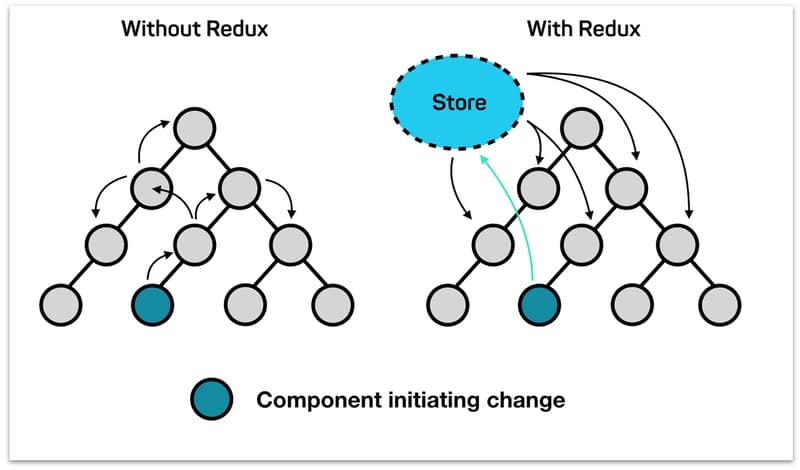
As applications grow, managing state that's shared across many components becomes a real challenge. Props can be passed down one or two levels without issue, but when you find yourself threading the same data through five layers of components that don't even use it (prop drilling), it's time for a dedicated state management solution. Redux is the most established choice in the React ecosystem.

Redux is built on three principles:
- Single store holds the application state representing the single source of thruth.
- State is read-only and can only be changed by dispatching actions.
- Changes are made through pure functions called reducers.
Install Redux Toolkit:
npm install @reduxjs/toolkit
Here's what a modern Redux setup looks like using Redux Toolkit, which is now the recommended way to write Redux:
import {useDispatch, useSelector } from 'react-redux'
import type { RootState, AppDispatch } from '../redux/store'
import type { TypedUseSelectorHook } from 'react-redux'

export const useAppDispatch = () => useDispatch<AppDispatch>()
export const useAppSelector: TypedUseSelectorHook<RootState> = useSelector
import { createSlice } from '@reduxjs/toolkit'
import type { PayloadAction } from '@reduxjs/toolkit'


interface States {
  state1: number,
  state2: number
}

const initialState: States = { state1: 0, state2:0 }

const stateSlice = createSlice({
    name:'state',
    initialState,
    reducers : {
        setNewState1: (state, action:PayloadAction<number>) => {
            state.state1 = action.payload
        },
        setNewState2: (state, action:PayloadAction<number>) => {
            state.state2 = action.payload
        }
    },
})

export const {setNewState1, setNewState2} = stateSlice.actions
export default stateSlice.reducer
import { configureStore } from '@reduxjs/toolkit'
import stateReducer from "./StateSlice"

export const store = configureStore({
  reducer: {
    state: stateReducer
  },
})
export type RootState = ReturnType<typeof store.getState>
export type AppDispatch = typeof store.dispatch
import { useAppSelector } from "../../hooks/StoreHook";

export default function State1() {

    const state1 = useAppSelector((state) => state.state.state1)
  return (
    <div className="border cursor-default rounded-md font-bold bg-orange-400 hover:bg-orange-500 transition-colors w-fit py-5 px-8">
      <span className="font-normal">State1 : </span>{state1}
    </div>
  );
}
import { useAppSelector } from "../../hooks/StoreHook";

export default function State2() {
    const state2 = useAppSelector((state) => state.state.state2)
  return (
    <div className="border cursor-default hover:bg-green-500 font-bold transition-colors rounded-md bg-green-400 w-fit py-5 px-8">
      <span className="font-normal">State2 : </span>{state2}
    </div>
  );
}
import { useState } from "react";
import State1 from "./reduxComponent/State1";
import State2 from "./reduxComponent/State2";
import { setNewState1, setNewState2 } from "../redux/StateSlice";
import { useAppDispatch } from "../hooks/StoreHook";

export default function StateManagement() {
  const [error, setError] = useState(false);
  const dispatch = useAppDispatch();
  const [state, setState] = useState(String);
  return (
    <div className="flex justify-center mt-5">
      <div className="w-1/3">
        <div className="flex justify-between">
          <input
            className={`
          w-96 px-4 py-2 border rounded-lg
          focus:outline-none focus:ring-2 focus:ring-blue-500 focus:border-transparent
          disabled:bg-gray-100 disabled:cursor-not-allowed
          transition-all duration-200
          ${error ? "border-red-500 focus:ring-red-500" : "border-gray-300"}
        `}
            type="text"
            value={state}
            onChange={(e) => setState(e.target.value)}
          />
          <button
            onClick={() => {
              dispatch(setNewState1(Number(state.split(" ")[0])));
              dispatch(setNewState2(Number(state.split(" ")[1])));
            }}
            className="px-5 border rounded-md hover:bg-blue-600 transition-colors bg-blue-400 text-white"
          >
            Update
          </button>
        </div>
        <div className="flex justify-between mt-8">
          <State1 />
          <State2 />
        </div>
      </div>
    </div>
  );
}
Found this useful? Share it!
Read the Full Story
Continue reading on Dev.to
Related Stories
Majority Element
about 2 hours ago
Building a SQL Tokenizer and Formatter From Scratch — Supporting 6 Dialects
about 2 hours ago
Markdown Knowledge Graph for Humans and Agents
about 2 hours ago

Moving Beyond Disk: How Redis Supercharges Your App Performance
about 2 hours ago