Getting into web development is exciting, but before you write your first line of code, you must set up your laptop properly. A clean and well-configured development environment will save you hours of frustration and allow you to focus on what actually matters, learning how to build web applications
TK Dev Console
Getting into web development is exciting, but before you write your first line of code, you must set up your laptop properly. A clean and well-configured development environment will save you hours of frustration and allow you to focus on what actually matters, learning how to build web applications.
Most beginners think the hard part is learning HTML, CSS, or JavaScript. In reality, the first challenge is knowing which tools to install and how to configure them correctly.
This guide walks you through the essential laptop setup every beginner web developer needs in 2026. Once you install these tools, your system will be ready for coding, building projects, and learning modern web development. 🚀
Table of Contents
Installing Chrome Browser
Git Bash Installation
Visual Studio Code Installation
NodeJS Installation
Installing Chrome Browser
A modern browser is a critical tool for every web developer. I strongly recommend installing Google Chrome because it provides excellent developer tools for debugging and testing websites.
To install Chrome:
- Open your current browser and search for “Chrome download.”
- Click the first result from Google.
- You will be taken to the official download page.
You should see a blue download button clearly visible on the page.
Click the Download button and the installer will begin downloading automatically.
Once the download is complete:
- Open your Downloads folder
- Double-click the ChromeSetup.exe file
- Follow the installation prompts
The installation process usually takes only a few minutes.
Git Bash Installation
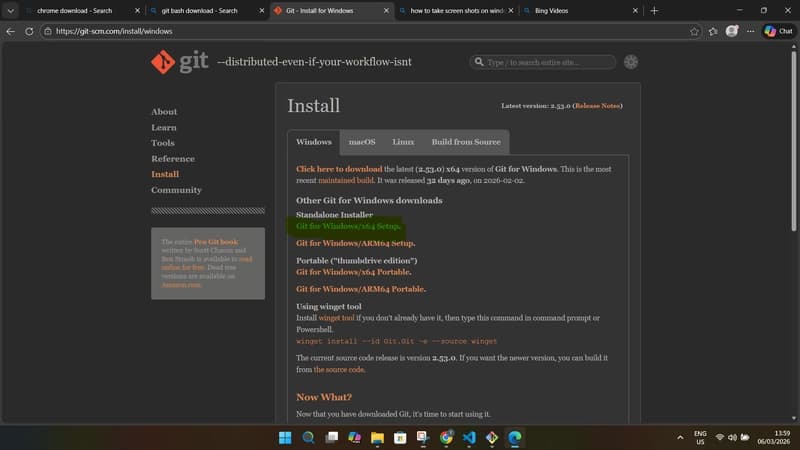
Git Bash is a command-line tool that allows you to run Git commands and Linux-style terminal commands on Windows. Every developer should become comfortable using the terminal because it is faster and more powerful than clicking through folders.
To install Git Bash:
- Search for “Git Bash download” in your browser.
- Click the official git-scm.com result.
- Select the version for Windows.
- Download the Standalone Installer.
Your download will start automatically.

Once the download is complete:
- Open your Downloads folder
- Double-click the installer file (for example: Git-2.xx.x-64-bit.exe)
- Click Next through the setup interface
- Keep the default recommended settings
- Continue until the installation bar appears

Once finished, Git Bash will be installed on your computer.
Visual Studio Code Installation
Every developer needs a good code editor. The most widely used editor today is Visual Studio Code, created by Microsoft.
VS Code is lightweight, powerful, and packed with features that make writing code easier.
To install VS Code:
- Search for “Visual Studio Code download.”
- Click the official Microsoft link.
- Select your operating system (Windows, macOS, or Linux).

The installer will begin downloading automatically.
After the download finishes:
- Open the Downloads folder
- Double-click the VS Code installer
- Accept the terms and conditions
- Click Next through the installation steps

Make sure you select the recommended options during installation.

Once installation is complete, the VS Code icon will appear on your desktop, and you can start writing code immediately.
Node.js Installation
Node.js is an open-source JavaScript runtime that allows developers to run JavaScript outside the browser. It is a fundamental tool for modern web development.
To install Node.js:
- Search for “Node.js download.”
- Click the official website.
- Scroll down to find the Windows Installer (.msi) option.
Avoid the Docker instructions on the page for now as i don't expect you to have docker installed. As a beginner, you only need the installer.
Download the .msi installer file.

Once the download finishes:
- Open the Downloads folder
- Double-click the Node installer
- Click Next
- Accept the terms and conditions
- Continue clicking Next until you see the Install button
- Click Install

After installation is complete, Node.js will be ready to use.
Important:
Node.js automatically installs npm (Node Package Manager), which developers use to install and manage JavaScript packages for their projects.
Final Thoughts
Once these tools are installed, your laptop is officially ready for web development.
At this stage, your goal is not to install every tool available. The goal is to build a simple, stable development environment that allows you to focus on learning and building projects.
As your experience grows, you will naturally discover new frameworks, tools, and workflows that improve your productivity.
Web development in 2026 offers more opportunities than ever before, and your laptop is the starting point of that journey.
Now that your environment is ready, there is only one thing left to do:
Start coding. Practice consistently. Build real projects.
Every skilled developer today started exactly where you are now—with a basic laptop setup and the decision to begin. 🚀
Found this useful? Share it!
Read the Full Story
Continue reading on Dev.to
Related Stories
Majority Element
about 2 hours ago
Building a SQL Tokenizer and Formatter From Scratch — Supporting 6 Dialects
about 2 hours ago
Markdown Knowledge Graph for Humans and Agents
about 2 hours ago

Moving Beyond Disk: How Redis Supercharges Your App Performance
about 2 hours ago