PowerBI is a business analytics platform developed and maintained by Microsoft. It has gained traction for its simplicity and has increasingly become the go to software for business analytics by many small, medium and large businesses. Many, if not most, of these businesses have their data stored in
Michael Mwai
PowerBI is a business analytics platform developed and maintained by Microsoft. It has gained traction for its simplicity and has increasingly become the go to software for business analytics by many small, medium and large businesses. Many, if not most, of these businesses have their data stored in databases because databases ensure the data is secure, has structure and can be stored and retrieved at anytime. Analytics platforms like powerBI therefore have to provide means through which analysts can access the company data that is housed in the databases.
Connecting PowerBI to a local postgres database
The following steps outline how to connect PowerBI to a local postgres database:
Launch PowerBI on your computer.
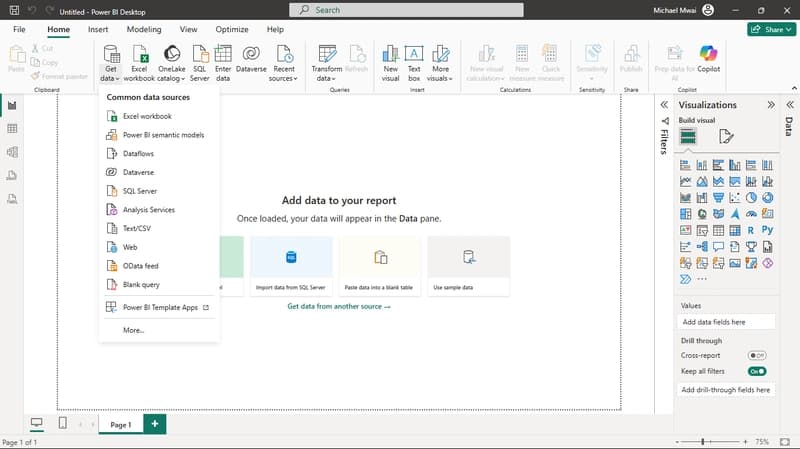
Create a Blank report and from the Home tab click on 'Get Data'.
Click on More... option on the Common Data Sources Wizard that appears

On the Get Data wizard box scroll down and locate PostgreSQL database option and select it. Click on the green Connect button at the bottom of the wizard.

The PostgresSQL database wizard appears with fields server and database to be filled. Since the postgres database is locally hosted, fill the server filled with localhost. You should also supply the port number of choice for this connection. The server name and port number is separated by a colon (:). By convention, the port number for postgreSQL is 5432 and will be the default port number if the port number is not supplied. If 5432, is unvailable, it is standard to use 5433. The server field will therefore be filled by localhost:5432
Proceed to fill the Database field with the name of database you want to connect to.
Proceed to Choose Data Connectivity Mode. Import Mode should be your go to connectivity mode if you want to do a full scale data analysis since it imports the data tables to your PowerBI allowing you to perfom EDA on the data.
Click OK to connect.
A Navigator wizard box appears upon successful connection showing your database on the left pane with the tables it holds under it. Select the tables you wish to use by checking the checking box next to it.

Click Transform if the data in the tables needs any transformation before use, otherwise, click Load to load all tables into your model.
Connecting to a Postgres Database Hosted on the Cloud
For this demonstration, I will showing how to connect to a postgres database hosted on Aiven. Aiven is an open source data platform that offers a variety of services including databases like MySQL and PostgreSQL.
Ensure you have set up your postgres database on Aiven before taking the following steps:
- Sign in to your Aiven account
- After logging in, on the menu on the left, select services to show the services under your account.
- Locate the postgres service and ensure it is running. If not, click on the Action ('...') button the farthest right of the service to restart the service.

- Click on your postgres services to view the connection details of your service like host, database name, port number, user, password.

- Open a blank PowerBI report, click Get Data from the Home Tab and then More... option then PostgresSQL database and click Connect.


- Populate the Server and Database fields with the information from the Connection details from Aiven.
 Click connect and provide the Username, password and click connect.
- Select the tables to add to your Data Model and click Load to load the tables or Transform to transform the data before loading for use.
Found this useful? Share it!
Read the Full Story
Continue reading on Dev.to
Related Stories
Majority Element
about 2 hours ago
Building a SQL Tokenizer and Formatter From Scratch — Supporting 6 Dialects
about 2 hours ago
Markdown Knowledge Graph for Humans and Agents
about 2 hours ago

Moving Beyond Disk: How Redis Supercharges Your App Performance
about 2 hours ago