In this article, we'll explore how to connect Power BI to a PostgreSQL database, a popular open-source relational database management system. We'll cover both local and cloud-based PostgreSQL connections, discuss data modeling, and highlight the importance of SQL skills for Power BI analysts. What i
JOAN NJOKI
In this article, we'll explore how to connect Power BI to a PostgreSQL database, a popular open-source relational database management system. We'll cover both local and cloud-based PostgreSQL connections, discuss data modeling, and highlight the importance of SQL skills for Power BI analysts.
What is Power BI and Why is it Used?
Power BI is a business analytics tool that allows you to analyze data, create compelling visualizations, and share insights across your organization. It's used for data analysis, business intelligence (BI), and creating interactive reports and dashboards. Power BI enables data professionals to connect to a wide range of data sources, transform and clean the data, and build data models.
Connecting Power BI directly to databases is essential for:
- Real-Time Data Analysis using Dashboards
- Efficiently storing and managing vast amounts of data
- Centralized Data Management
- Managing complex Data Relationships
SQL databases (like PostgreSQL) are fundamental for storing and managing analytical data because they provide:
- Structured data that ensures data consistency and accuracy.
- Efficient querying with SQL for powerful and efficient data retrieval and manipulation.
- Scalability to accommodate growing datasets and increasing user demands.
- Data integrity to maintain data reliability
Connecting Power BI to a Local PostgreSQL Database
1. Open Power BI
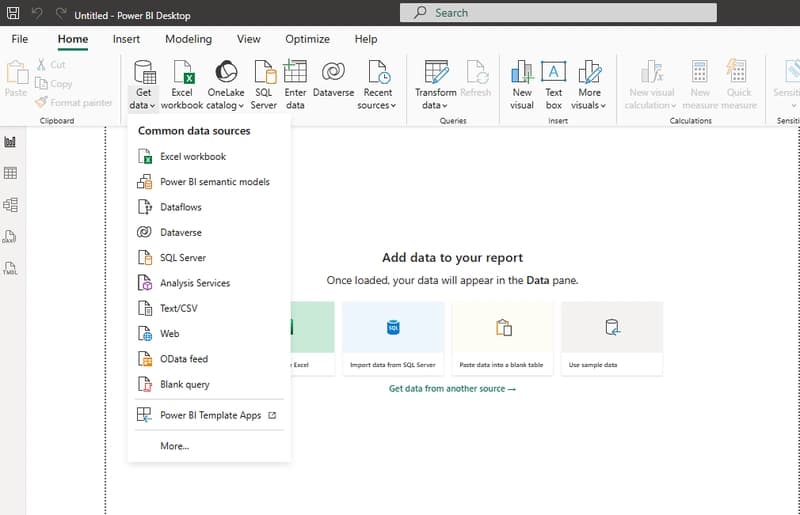
Launch the Power BI Desktop application and click on the "Get Data" button on the "Home" ribbon

2. Choose PostgreSQL
From the list of choices, click on more and select PostgreSQL Database and click on connect

3. Enter Server Details
Enter the local database details from your pgAdmin 4: server as localhost and the specific name of the database you are connecting to.

4. Provide Credentials
Enter your Username and Password as set up during your PostgreSQL installation.

5. Load Tables
After successfully authenticating, a "Navigator" window will appear, displaying all the tables and views in your database. Select the relevant tables (e.g., customers, products, sales, inventory) and click "Load."

After loading your data, choose the table view to view your data in table format or the model view to see the relationships and create schemas.


Connecting Power BI to a Cloud Database (Aiven PostgreSQL)
Aiven, a cloud database service, provides a secure PostgreSQL environment
1. Obtain Connection Details from Aiven
Log in to your Aiven account and locate your postgreSQL service

From the dashboard, you will find information on:
Host name
Port number
Database name
Username
Password

2. Download the SSL Certificate
In the Aiven console, under the "Overview" or "Connection Information" section for your service, you will see an option to download the "CA Certificate" or "SSL Certificate."
3. Establish the Connection in Power BI
Launch the Power BI Desktop application and click on the "Get Data" button on the "Home" ribbon
4. Choose PostgreSQL
From the list of choices, click on more and select PostgreSQL Database and click on connect
5. Enter Server Details
Enter the database details from your aiven service with the server details as Host:Port


Preview the data and load it

Read the data in table view to clean and remove duplicates or report view to establish relationships between the tables


Data Modeling
Data modeling in Power BI involves creating a logical structure for your data, ensuring that Power BI understands how different tables interact. The fundamental concept is establishing relationships between tables using common columns (keys).
To create a new relationship, open model view in power BI and click on manage relationships

Select +New relationship

Select the tables with similar primary keys that you want to join

Click on save and close to view the new relationship

The importance of data modelling in Power BI
Relationships are critical for calculating correct results in visualizations. When you create a chart showing sales by product category (where sales and product details are in different tables), Power BI uses the defined relationship to aggregate the sales data accurately according to the product category.
They allow for dynamic filtering. If you select a specific customer in one chart, all other linked charts and tables in your report will automatically filter to show data only for that selected customer.
Why SQL Skills are Important for Power BI Analysts
While Power BI provides a robust user interface for connecting to and importing data, proficiency in SQL is highly beneficial for Power BI analysts for several key reasons:
- Data Retrieval: Analysts can write custom SQL queries (using Power BI's "Advanced options" or "SQL statement" field during the connection phase) to retrieve only the required data. This avoids importing irrelevant or excessive data, significantly improving report performance.
- Filtering: complex filtering conditions can be applied directly in the SQL query, moving the data filtering load to the database server itself, which is often more efficient.
- Aggregations: SQL allows for pre-aggregating data (e.g., calculating daily sales summaries instead of importing every individual sales transaction). This creates a smaller, more optimized dataset for Power BI to handle.
- Data Transformation: Basic data cleaning, transformations (like formatting dates or combining columns), and calculations can be done using SQL functions before the data even enters Power BI. This leads to a cleaner and simpler data model within Power BI itself.
- Query Performance Tuning: If a Power BI report is slow to refresh, understanding the underlying SQL queries can help analysts identify and optimize inefficient database access patterns.
- DirectQuery Mode: Power BI's "DirectQuery" mode sends queries directly to the database in real-time. Crafting optimal SQL queries is absolutely essential for acceptable performance when using this mode with large datasets.
Conclusion
Connecting Power BI to PostgreSQL, whether local or cloud-based, empowers you with real-time data access and the ability to analyze complex datasets. By understanding data modeling principles and leveraging SSL certificates for security, you can build reliable and impactful business intelligence solutions. While Power BI streamlines the analysis process, mastering SQL skills remains a critical differentiator for analysts, enabling them to optimize data retrieval, enhance performance, and deliver deeper, more accurate insights from their database connections
Found this useful? Share it!
Read the Full Story
Continue reading on Dev.to
Related Stories
Majority Element
about 2 hours ago
Building a SQL Tokenizer and Formatter From Scratch — Supporting 6 Dialects
about 2 hours ago
Markdown Knowledge Graph for Humans and Agents
about 2 hours ago

Moving Beyond Disk: How Redis Supercharges Your App Performance
about 2 hours ago