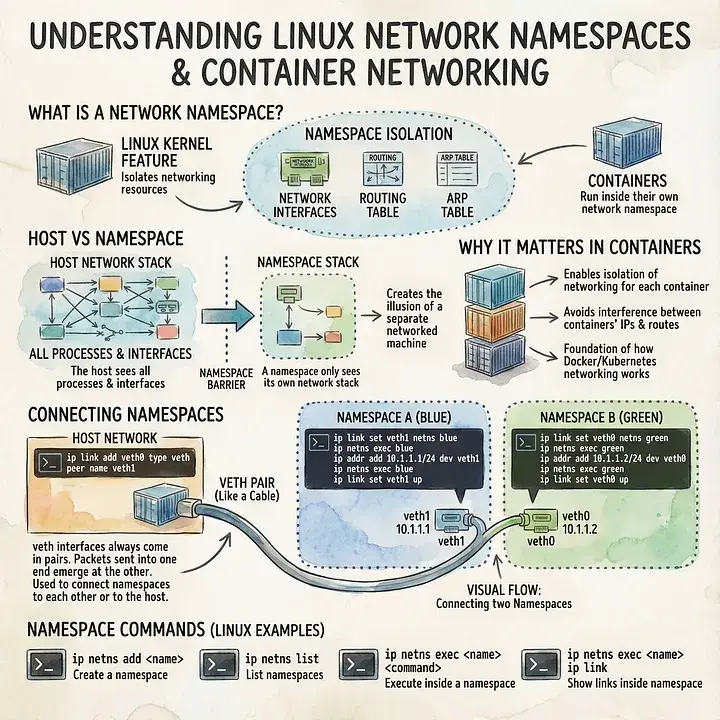
Modern container technologies like Docker and Kubernetes rely heavily on Linux kernel features to provide isolation and security. One of the most fundamental, yet often misunderstood of these features is the network namespace. Network namespaces are what give containers the illusion of having their
Alhousseïni Mohamed

Modern container technologies like Docker and Kubernetes rely heavily on Linux kernel features to provide isolation and security. One of the most fundamental, yet often misunderstood of these features is the network namespace.
Network namespaces are what give containers the illusion of having their own network stack: their own interfaces, IP addresses, routing tables, and ARP tables; completely isolated from the host and from other containers.
In this article, we’ll break down how network namespaces work, why they are essential for container networking, and how Linux connects isolated namespaces together using virtual Ethernet (veth) interfaces. Through concrete commands and examples, you’ll see how containers are isolated from the host and how they can still communicate with each other when needed.
By the end, you’ll have a clear mental model of what happens under the hood when a container gets network access.
1. How does networking work in case of containers

Routing and ARP table inside a namespace
By default, a host wich is connected to a LAN has it owns routing table and ARP table and we would like to seals them all from the container. When we create a container, we create it’s own Network Namespace. So, it gets it’s own virtual interface, routing and ARP table.
To create a new Network Namespace on a Linux host we run this command :
ip netns add <new namespace name>
For example, let’s say you wanted to create a namespace called “blue”. You’d use this command:
ip netns add blue
To verify that the network namespace has been created, use this command:
ip netns list
You should see your network namespace listed there, ready for you to use.
To be sure that your virtual network can be seen by the host, but inside the namespace your container can’t see the host virtual network run those commands :
First on the host ( Your should see your host virtual interface and the one sed by your container ) :
ip link
Then from inside the Network Namespace ( You should only see your container interface, not your host one. ) :
ip netns exec blue ip link
NB : The same goes for the ARP table and Route table.
2. The tricky part

Connecting two networks namespaces virtual interfaces
Let say we create two Network Namespaces, but then how do we make so that they are connected ?
Creating the network namespace is only the beginning; the next part is to assign interfaces to the namespaces, and then configure those interfaces for network connectivity.
Virtual Ethernet interfaces are an interesting construct; they always come in pairs, and they are connected like a tube — whatever comes in one veth interface will come out the other peer veth interface. As a result, you can use veth interfaces to connect a network namespace to the outside world via the “default” or “global” namespace where physical interfaces exist.
Let’s see how that’s done. First, you’d create the veth pair:
ip link add veth0 type veth peer name veth1
I found a few sites that repeated this command to create veth1 and link it to veth0, but my tests showed that both interfaces were created and linked automatically using this command listed above. Naturally, you could substitute other names for veth0 and veth1, if you wanted.
You can verify that the veth pair was created using this command:
ip link list
You should see a pair of veth interfaces (using the names you assigned in the command above) listed there. Right now, they both belong to the “default” or “global” namespace, along with the physical interfaces.
Let’s say that you want to attach the veth1 interface to the blue namespace. To do that, you’ll need to use this command:
ip link set veth1 netns blue
PS : You do the same for the veth0 interface to attach it to your second namespace.
You then assign an ip to each namespace using this command :
ip -n blue addr add 192.168.10.1 dev veth1

  The same goes for tyour second namespace :

ip -n second_namespace addr add 192.168.10.2 dev veth0
This command assign the ip 192.168.10.1, to the namespace blue using the veth1 interface.
To finish, you then bring up the interface using the IP link command, on each one of the respective namespace:
ip -n blue link set veth1 up
Your namespace can now reach each other !
You can check this, by looking at one of your network namespace :
ip netns exec blue arp
This command will show the second namespace ARP table, that is connected to the blue namespace.
Conclusion
Network namespaces are a core building block of Linux containerization. They provide strong isolation by giving each container its own network stack — including interfaces, routing tables, and ARP tables — while still allowing the host full visibility and control.
On their own, namespaces are completely isolated. The real magic happens when we connect them using veth pairs, which act like virtual network cables. By attaching each end of a veth pair to different namespaces and assigning IP addresses, we can enable controlled communication between containers while preserving isolation.
Found this useful? Share it!
Read the Full Story
Continue reading on Dev.to
Related Stories
I wanted shadcn/ui for Blazor. It didn’t exist. So I built it.
about 19 hours ago
Shipping Fast with AI? You’re Probably Shipping Vulnerabilities Too.
about 19 hours ago

Oops, I Vibecoded Again. Please Help Me! — A CSS Refiner
about 19 hours ago

💳 Détection de Fraude Bancaire & IA : Ma contribution au Notion MCP Challenge
about 19 hours ago