As frontend developers, we’re constantly exploring tools that help us move faster, from ideation to prototypes to production‑ready UI. Google Stitch has recently had a major revamp, positioning itself as an AI‑native design assistant that promises to help us explore layouts, generate UI structures,
Asmaa Almadhoun
As frontend developers, we’re constantly exploring tools that help us move faster, from ideation to prototypes to production‑ready UI. Google Stitch has recently had a major revamp, positioning itself as an AI‑native design assistant that promises to help us explore layouts, generate UI structures, and test ideas without jumping into code immediately.
While Stitch isn’t a full replacement for real design tools or real designers, it can play a meaningful role in a modern frontend workflow. Here’s how you can practically use it as a developer.
Example: Creating a Landing Page With Google Stitch
Move from idea → layout → code in minutes. Below is a simple, practical workflow showing how you can generate a landing page using Stitch, refine it, and turn it into usable frontend code.
Each step includes a soft, rounded hybrid-style diagram to visually guide the user.
1️⃣ Step 1, Open Google Stitch
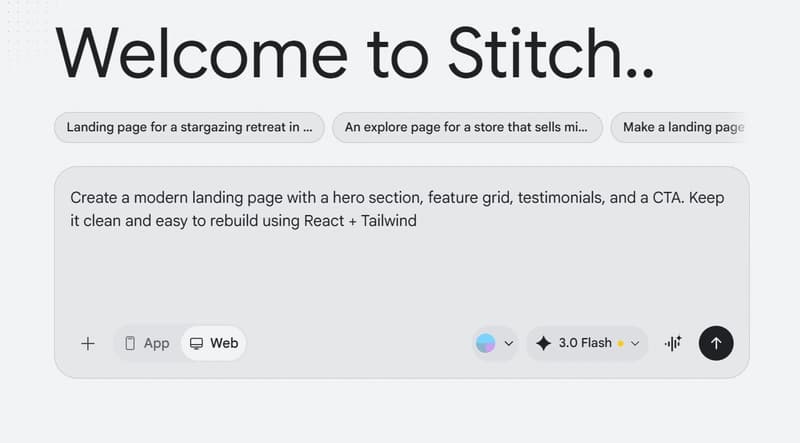
To begin, you visit Stitch and select your mode (Web or App).
This is where you pick the model and start your design session.
2️⃣ Step 2, Enter Your First Prompt
Stitch works best with clear natural‑language instructions. You describe the structure and feel of the landing page, and Stitch generates the UI.
Example prompt:
“Create a modern landing page with a hero section, feature grid, testimonials, and a CTA. Keep it clean and easy to rebuild using React + Tailwind.”

3️⃣ Step 3, Stitch Generates the Layout
Stitch analyzes your prompt and files, then produces the first version of your layout.
It typically includes full sections like the following

4️⃣ Step 4, Refine Using Follow‑Up Prompts
Just like a conversation, you can refine the design by telling Stitch what to change.
This is ideal for adjusting spacing, layout balance, color contrast, and visual hierarchy.
Examples:
- “Increase spacing in the hero section.”
- “Make the color palette darker.”
- “Increase CTA visibility.”

5️⃣ Step 5, Export the Code
One of Stitch’s strengths is its code export ability.
After generating your design, you can extract HTML/CSS or even React‑friendly markup to speed up your build, you will find
- Landing page (html)
- Design file contains rules
- Screen file is full Image of your landing page design

6️⃣ Step 6, Paste Into Your Code Editor
Paste the exported code into your editor (VS Code, WebStorm, etc.).
From here, you refine the structure, add Tailwind or your design tokens, and integrate real content.
🎉 Final Thoughts
Using Google Stitch as a frontend developer dramatically accelerates:
- UI ideation
- Layout prototyping
- Early‑stage design exploration
- Hand‑off between design & code
- Building real landing page code faster
Stitch doesn’t replace designers or developers, but it makes frontend workflows smoother and faster, especially when you need structure before styling.
Found this useful? Share it!
Read the Full Story
Continue reading on Dev.to
Related Stories
I wanted shadcn/ui for Blazor. It didn’t exist. So I built it.
about 19 hours ago
Shipping Fast with AI? You’re Probably Shipping Vulnerabilities Too.
about 19 hours ago

Oops, I Vibecoded Again. Please Help Me! — A CSS Refiner
about 19 hours ago

💳 Détection de Fraude Bancaire & IA : Ma contribution au Notion MCP Challenge
about 19 hours ago